Delta Updates with btrfs and Mender
With delta updates, a large IoT fleet can save several million euros per year in data costs thanks to smaller update artifacts. However, the fleet may already be a bit outdated, and the option for delta updates may not have been included from the start. So it’s time to retrofit this feature into the existing fleet. Of course, the robustness of the update must not be compromised under any circumstances; it must be possible to install the feature via an OTA update, and downgrading should remain an option. These are not easy constraints - but we are ready to take on the challenge.
Current Setup
The current setup comes with the following four partitions:
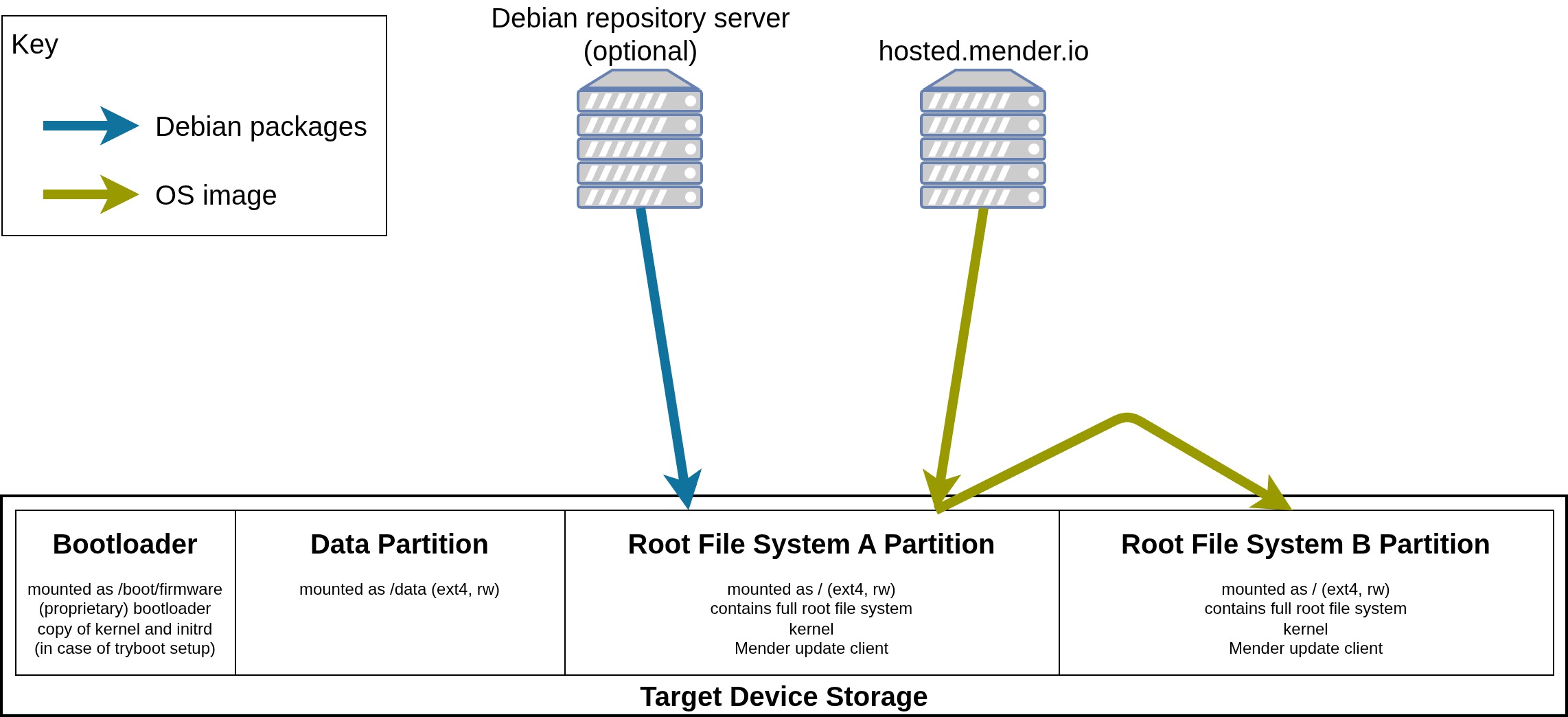
The biggest hurdle is that the ext4 file system on the active root partition is writable. This means there is no way to reconstruct an exact copy of the currently installed system, since the root file system has certainly already been modified by the time the system is first booted. However, a delta update must be able to build upon a precisely defined state. Now, one might hope that an artifact remained from a previous OTA update, which could be used to reconstruct the initial state. However, during the OTA update, Mender streams the root file system directly to the partition, so this method is also blocked.
Of course, one could now consider what an ideal system might look like from today’s perspective, and that might lead to a design with more than four partitions. However, the idea of repartitioning the existing devices during an OTA update was rejected due to concerns about robustness.
btrfs to the Rescue
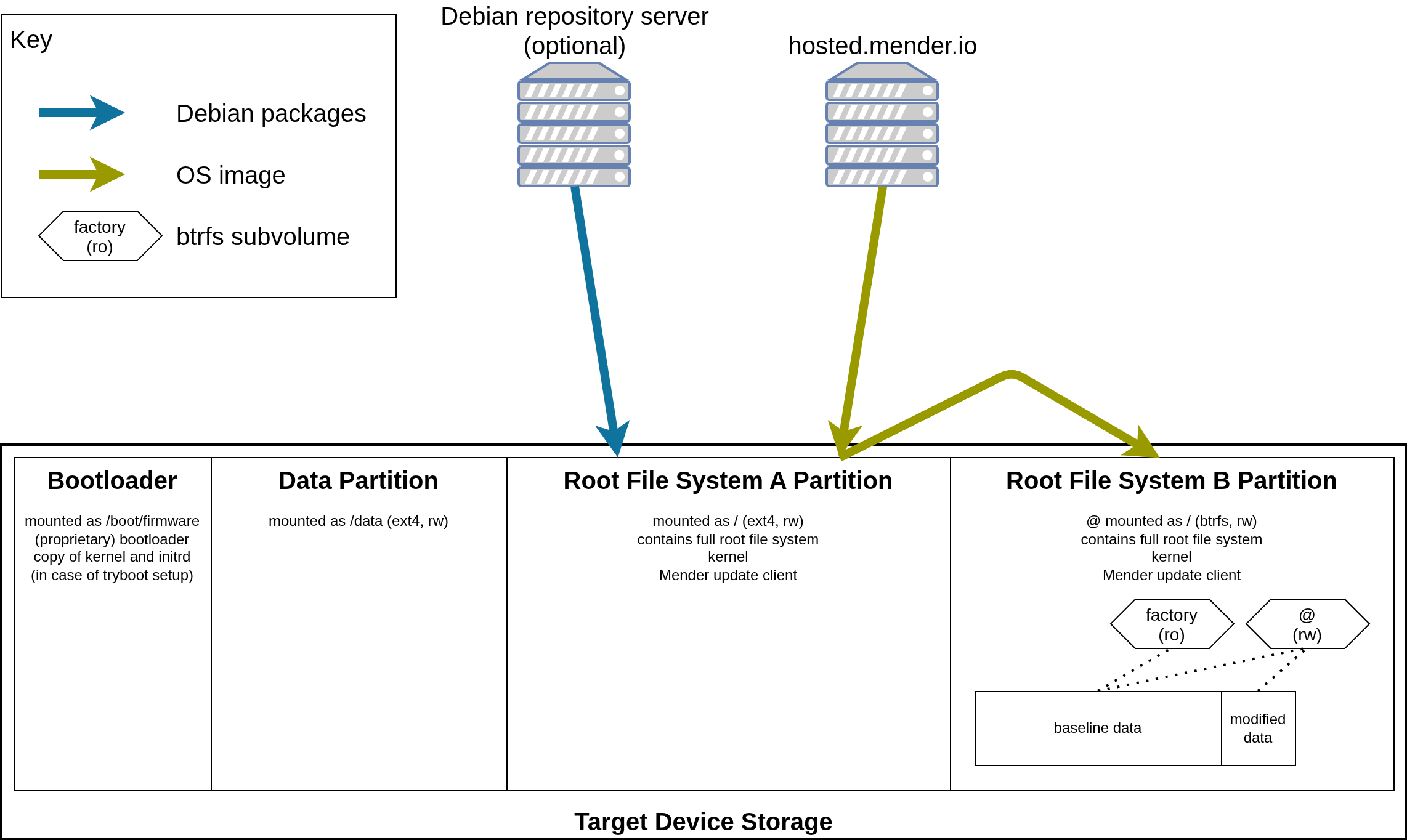
Fortunately, the file system on the inactive partition can be changed without any problems. This opens the door for the btrfs file system, as it offers exciting possibilities: It uses a copy-on-write architecture where subvolumes act as independent file tree roots. Individual subvolumes can be marked as read-only, which guarantees that they do not get modified. So we’re building our new root file system based on btrfs and adding a single read-only factory subvolume. During the first boot into the new root file system, an initramfs created by dracut will generate a new subvolume @, which will become the root file system mounted as read-write:
btrfs subvolume snapshot "${_rootmnt}"/factory "${_rootmnt}"/@
btrfs subvolume set-default "${_rootmnt}"/@
After booting from the B partition, the system looks like this:
For this first step, a complete OS artifact was still required. Things get interesting when another OS update is needed. From now on, you can work with delta updates:
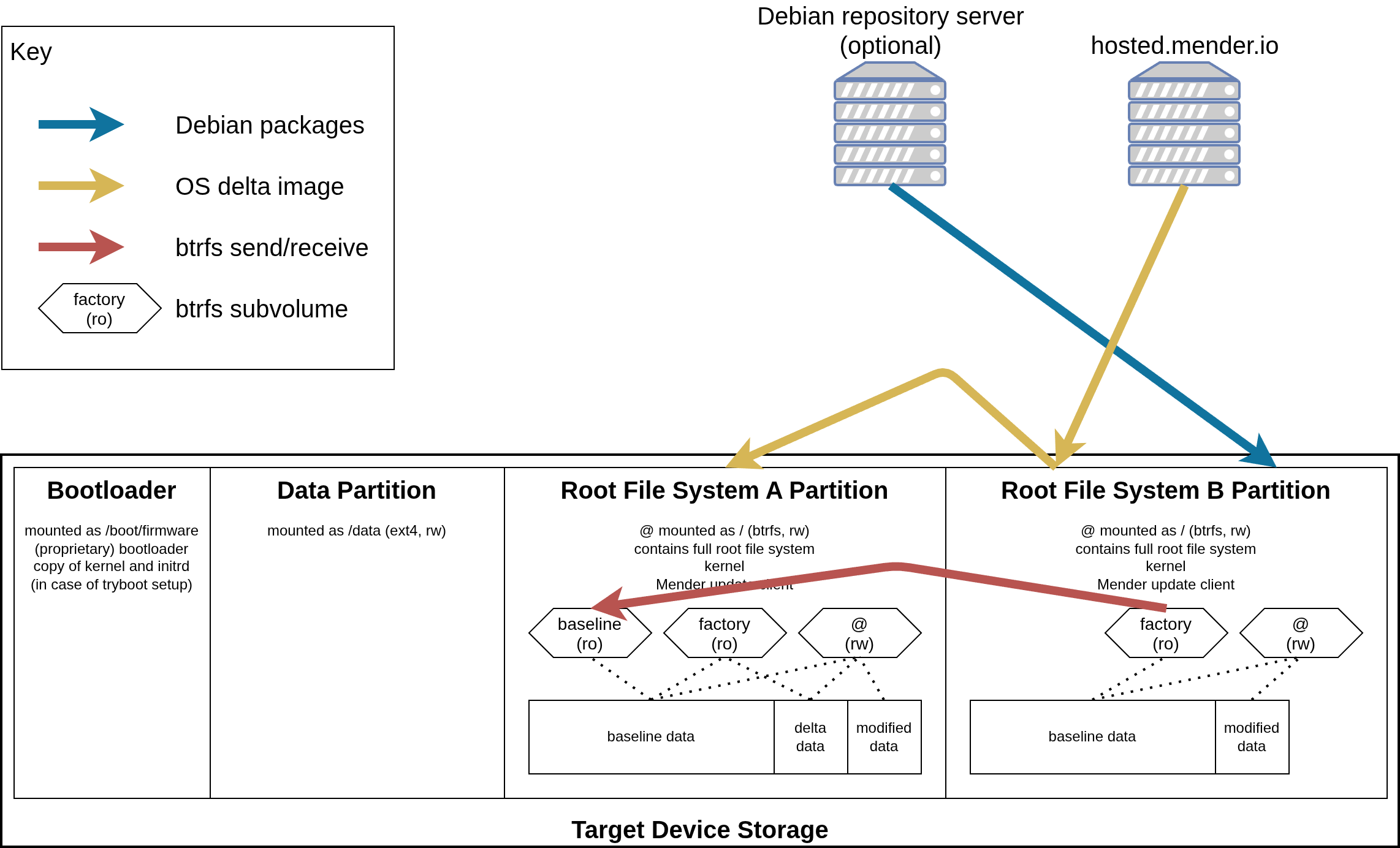
In the first step, the factory subvolume is transferred from the B partition to the A partition using btrfs send/receive and reproduced there as a read-only baseline subvolume. All that remains is to download a delta package from the update server and apply it based on the baseline subvolume.
btrfs send --proto 2 "$ACTIVE_MNT"/factory/ | sudo btrfs receive "$PASSIVE_MNT"
mv "$PASSIVE_MNT"/factory "$PASSIVE_MNT"/baseline
< "$BTRFS_DELTA" btrfs receive "$PASSIVE_MNT"
btrfs subvolume set-default "$PASSIVE_MNT"/factory/
This results in a factory subvolume that is identical to the one you would have obtained if you had installed a complete OS artifact. Upon the first reboot, a script in the initramfs will again create the @ subvolume.
Creating Small Delta Artifacts
The process for generating delta artifacts is simple: Two complete OS artifacts, A and B, are passed to a script, and the result is the delta artifact C, which can reproduce artifact B based on artifact A:
$ scripts/create-delta-package artifacts/pi4.mender artifacts/pi4-gitops.mender
Reading Artifact...
.............................................................. - 100 %
Reading Artifact...
.............................................................. - 100 %
Extracting existing artifacts...
Creating btrfs delta artifact...
Writing Artifact...
Version             	✓
Manifest            	✓
Manifest signature  	✓
Header              	✓
Payload
.............................................................. - 100 %
Success: /home/lueschem/edi-workspace/edi-pi/artifacts/2026-09-18-1613-pi4-gitops-trixie-arm64-baseline-2026-09-18-1612-pi4-trixie-arm64.mender created!
To minimize the size of the delta artifact, it is essential that artifacts A and B be generated in a reproducible manner. A
carefully crafted edi project configuration achieves this goal thanks to Debian’s excellent groundwork. Of particular
note is the SOURCE_DATE_EPOCH environment variable: it ensures that the timestamps within the artifacts are
reproducible. One relatively large file within the artifacts is, for example, the initramfs, which is created using
dracut. The latest versions of dracut take SOURCE_DATE_EPOCH into account directly, whereas in the Debian Trixie
version, the dracut option reproducible="yes" must be configured.
What the Approach Unlocks
The best thing about the approach described above is, of course, that it suddenly makes it possible to perform clean delta updates on existing devices, which can lead to massive savings in data and, consequently, costs. However, a few other exciting use cases are now also possible:
A truly clean factory reset can be performed as follows (the data partition may still need to be wiped):
sudo btrfs subvolume set-default <ID_OF_FACTORY_SUBVOLUME> /
sudo reboot
A use case can also be added cleanly using a delta update. For example, in the case generated above, the Raspberry Pi 4 was supplemented with the gitops use case.
Finally, a btrfs delta can also be created on a problematic device, allowing the developer to perform a detailed offline analysis.
Outlook
There is currently a working implementation of the above approach for the Raspberry Pi 4 and 5 on this branch. Feedback and suggestions for improvement are very welcome. Tests so far have been successful, and I am confident that I will be able to migrate the edi project configurations to the new approach in the near future. If all else fails, it is possible to revert to the old approach at any time.
Leave a comment